NOTE: As this is a real client project, some details have been modified or anonymised for confidentiality reasons.
The problem with doing it manually
The product data team at Schneider Electric manages a hierarchy of around 9,000 classification codes. These codes are not products themselves, they are the structure used to categorise products, and each code carries a set of attributes that must be correctly set and consistent across the hierarchy at all times.
The hierarchy is layered, something like A, A1, A13, A13B for example. Attribute values flow between levels in both directions depending on the attribute type: sometimes a child value is pushed up to the parent, sometimes a parent value is inherited by the child. Keeping this consistent manually, across thousands of codes, was exactly as difficult as it sounds.
When the team needed to update an attribute, the process involved manually replicating values across the relevant hierarchy levels, and then running through more than 80 data quality checks against business rules to validate the result. Both steps were done by hand, in Excel.
The core issue was reliability, not just time. With 80+ checks applied manually across a hierarchy of thousands of codes, the risk of a missed check or a propagation error was structural. The process was not set up to catch what it could not see.
The goal
Replace the manual process with a fully automated pipeline that handles hierarchy propagation, data quality validation, and data update without any manual intervention once a change is submitted.
The goal: Create an automated pipeline that detects changes, validates them against 80+ business rules, propagates them correctly through the hierarchy, and produces a full audit trail of every change, pass, and rejection.
Pipeline architecture
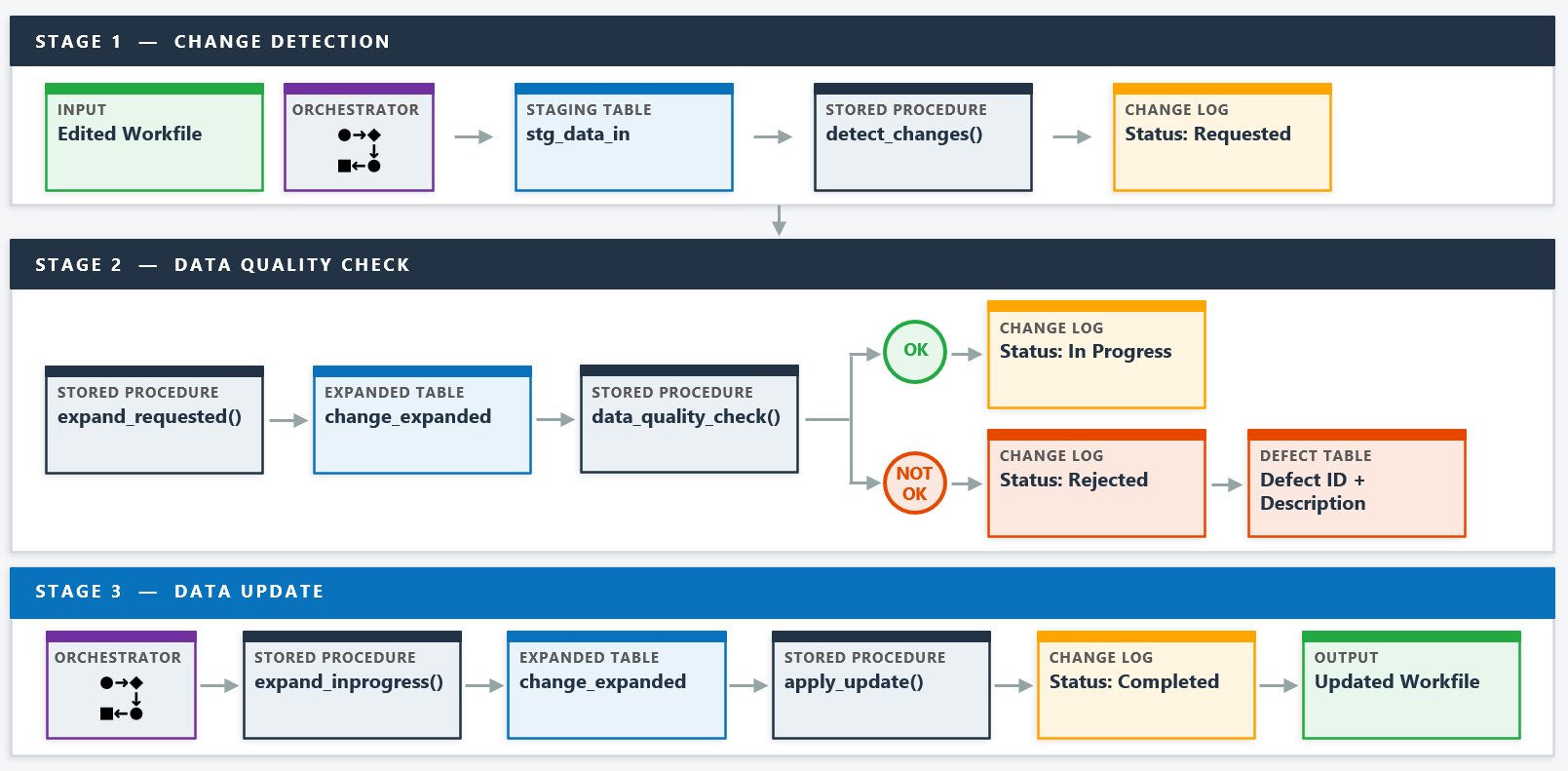
The pipeline is built entirely in SQL stored procedures and runs in three distinct stages. The master data team makes their changes to the workfile and triggers the first workflow, which runs Stage 1 and Stage 2 sequentially. This gives the team a chance to review any data quality issues before committing changes. Once satisfied, they trigger the second workflow to run Stage 3 and apply the updates.
Stage 1: Change detection
The first stage compares the edited workfile against the current state of the database to identify what has changed. Rather than asking the user to declare what they changed, the pipeline detects it automatically by diffing the two states.
The detection logic classifies each changed code as an INSERT, UPDATE, or DELETE. An INSERT is a code present in the new version but not the current state. A DELETE is the reverse. An UPDATE is a code present in both but with different attribute values. All three are written to the change log with a status of "Requested" and a timestamp.
WITH changes AS (
    -- Rows in new version but not current state
    SELECT *, 'new' AS record_type
    FROM stg_temp_in
    EXCEPT
    SELECT *, 'new' AS record_type
    FROM stg_temp_out

    UNION ALL

    -- Rows in current state but not new version
    SELECT *, 'existing' AS record_type
    FROM stg_temp_out
    EXCEPT
    SELECT *, 'existing' AS record_type
    FROM stg_temp_in
),
change_type AS (
    SELECT DISTINCT code,
        CASE
            WHEN COUNT(record_type) OVER (PARTITION BY code) = 1
                AND record_type = 'new'      THEN 'INSERT'
            WHEN COUNT(record_type) OVER (PARTITION BY code) = 1
                AND record_type = 'existing' THEN 'DELETE'
            ELSE 'UPDATE'
        END AS change_type
    FROM changes
)
INSERT INTO change_log
    SELECT
        changes.*,
        CURRENT_TIMESTAMP(0) AS request_datetime,
        change_type,
        'REQUESTED' AS status
    FROM changes
    INNER JOIN change_type ON changes.code = change_type.code
    WHERE NOT EXISTS (
        SELECT 1 FROM change_log cl
        WHERE cl.code = changes.code
        AND cl.status = 'IN PROGRESS'
    );
The final WHERE NOT EXISTS clause is an important guard. If a code already has a change in
progress, it will not be overwritten by a new submission. The team can submit the workfile as many times
as they like and only genuinely new changes will flow into the log.
Stage 2: Data quality checks
Hierarchy expansion
Before any data quality checks can run, each requested change needs to be expanded across the hierarchy. This is not straightforward, because the direction of propagation depends on the attribute.
For some attributes, a change at a child level needs to be pushed up to the parent. For others, the parent value is the authoritative one and needs to be passed down to children. The expansion stored procedure handles both cases, inserting the full set of affected hierarchy codes into a staging table so that every downstream check and update operates on the complete picture rather than just the directly edited record.
The expanded table is the central working surface for both the data quality check and the data update stages. By resolving the full hierarchy impact before validation begins, the checks can operate on a complete, consistent dataset rather than checking one record at a time in isolation.
The data quality check stage runs more than 80 business rules against the expanded change set. Each check is implemented as a SQL validation and writes any failures to a defect table with a defect code and a description of the issue. A change that fails any check is marked as "Rejected" in the change log and will not proceed to the update stage.
The checks cover several categories of business rule. Three examples illustrate the range:
Changes that pass all checks are updated to "In Progress" in the change log and queued for the update stage. Rejected changes remain in the log with their rejection status and a corresponding row in the defect table explaining what failed. The team can review the defect output, correct the source data, and resubmit.
Stage 3: Data update
The final stage picks up all changes with an "In Progress" status, re-expands them across the hierarchy one more time, and applies them to the production tables. The expansion step is repeated here rather than relying on the earlier staging data, which ensures the update is always working from a fresh, consistent state.
Once the updates are applied, the change log is updated to "Completed" with a timestamp and the output workfile is refreshed. The team then uses this updated workfile to apply the changes across all affected products in the update campaign.
After each run, the change log and defect table are exported so the team has a full record of what was processed, what passed, what was rejected, and why.
The audit trail
Every change that flows through the pipeline leaves a complete record in the change log. The log captures the code, the attribute values before and after the change, the request timestamp, the change type, and the final status. Rejected records include a link to the defect table entry that explains the failure.
This was not part of the manual process at all. Previously, if a question arose about when a change was made or why a value was set a particular way, there was no structured record to consult. The change log provides that traceability at no additional cost, as a natural output of the pipeline.
When building the 80+ automated checks, we identified several records in the existing master data that had not been detected by the manual process. These were legitimate data quality issues that had been present in production, invisible to the previous approach. The automated checks surfaced them on the first run.
Reflections
The most important design decision in this project was separating the pipeline into three distinct, independently triggerable stages rather than running everything in one pass. It gives the team control over timing, makes failures easier to diagnose, and means a rejection does not require restarting the whole process from scratch.
The hierarchy expansion step was the most technically complex part of the build. Getting the propagation direction right for each attribute type, and ensuring the expanded table was always complete before checks ran, required careful thought about sequencing. Building it as a reusable stored procedure called by both Stage 2 and Stage 3 was the right call.
The business rules were handed to me as a written specification and I converted them into SQL checks. That translation process is worth taking seriously. A rule that reads simply in plain language can have edge cases that only become visible when you try to express it as a query. Working closely with the product sales data team throughout the build meant those edge cases were caught during development rather than in production.
The outcome the team valued most was not the time saving, significant as it was. It was knowing that every change had been checked against every rule, every time, without exception. That reliability is something a manual process structured around human attention simply cannot guarantee at scale.
Questions about this project or the pipeline design? Get in touch.
↑ Back to top